Coatcheck user guide
From demo to deployment in an afternoon.
Everything a design partner needs: get the policy engine running, connect Slack and Salesforce, tune the rules in plain English, and govern any AI agent — not just Agentforce — through one simple API.
Part 1
Quickstart
Five steps, about thirty minutes. At the end, your agent will ask a human before doing anything risky — and you'll have approved your first action in Slack.
1 Deploy the policy engine
The engine is a small Python service. It decides allow, deny, or needs a human for every agent action, and writes every decision to a tamper-evident audit log.
Option A — Render (recommended for pilots). One click from the repo:
# In the Render dashboard: New → Blueprint → select
sentryops-dev/sentryops → Apply
# Fill in the secrets below when prompted, then deploy.
Option B — plain Python (works anywhere Python 3.10+ exists):
cd policy-engine
python3 app.py
# listening on http://localhost:8000
Option C — Docker:
cd policy-engine
docker compose up --build
# listening on http://localhost:8000, ledger persists in ./data/
Check it's alive:
curl -s http://localhost:8000/health
# {"status": "ok", "policy_version": "0.1.0"}
Heads up on free hosting: Render's free tier sleeps after ~15 minutes idle and takes 30–60 seconds to wake. Warm the /health URL before a demo. The audit ledger also resets on redeploy — attach a disk or move to paid hosting before any real pilot.
2 Connect Slack
Approval requests arrive as Slack cards with Approve, Deny, and Snooze 1 hour buttons. Three values connect the engine to your workspace:
- Create a Slack app at
api.slack.com/apps(or use an existing one). - Under Basic Information → App Credentials, copy the Signing Secret → set it as the
SLACK_SIGNING_SECRETenvironment variable on your engine. Tip: paste it through a plain-text editor first — invisible trailing whitespace breaks signature verification. - Under OAuth & Permissions, copy the Bot User OAuth Token (starts with
xoxb-) →SLACK_BOT_TOKEN. - Under Interactivity & Shortcuts, turn it on and set the Request URL to
https://<your-engine>/slack/actions. Slack will verify the URL — the engine must be reachable.
Invite the bot to the channel where approvals should land (we use #agent-approvals).
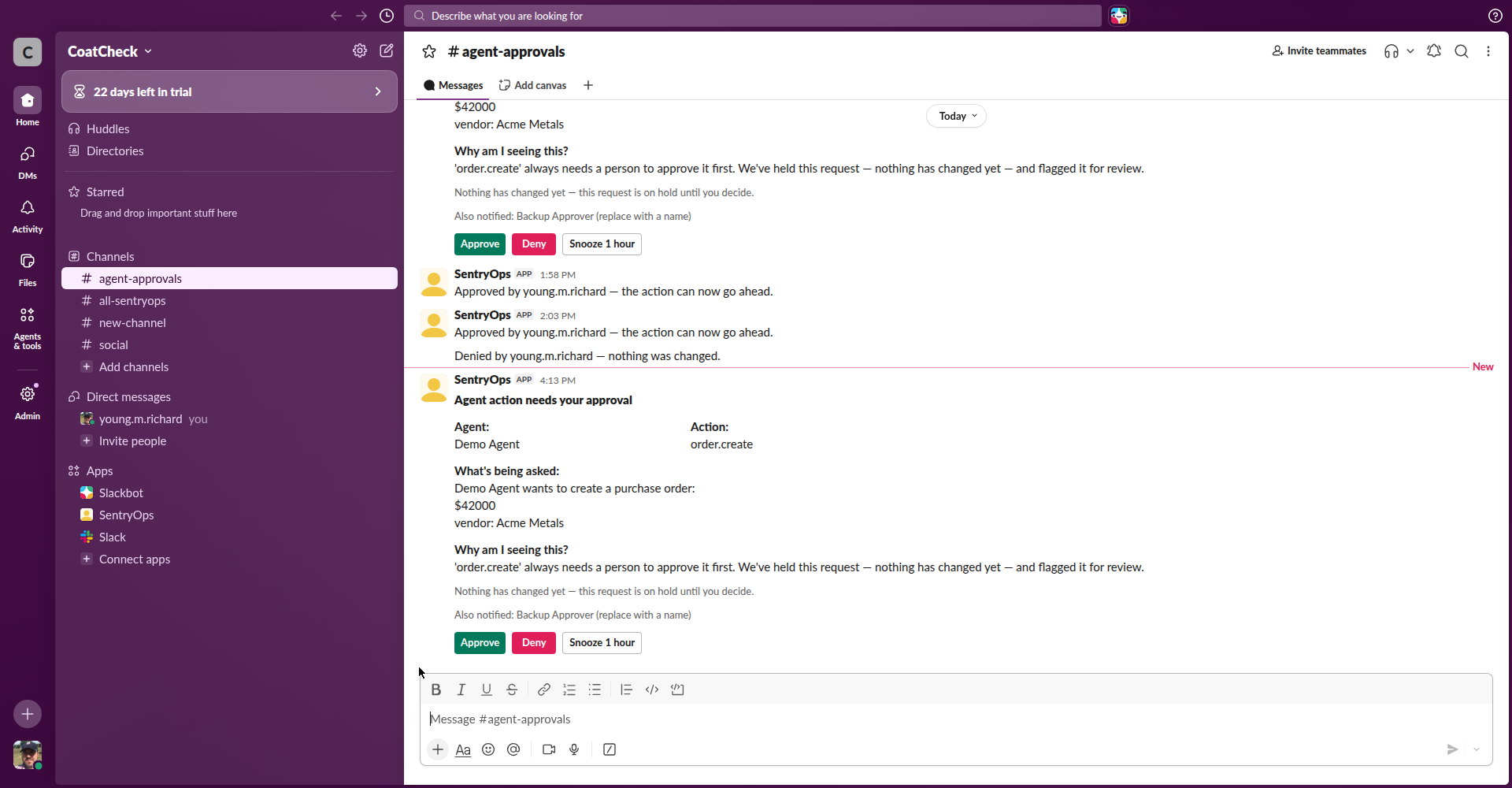
A real approval card. The approver sees what the agent wants to do, why it was held, and three buttons — nothing else to learn.
3 Install the Salesforce package
The Salesforce side is a set of Apex classes plus a custom object (SentryOps_Approval__c) that tracks each held request. Deploy with Workbench:
- Log in to Workbench (workbench.developerforce.com) with your org.
- Migration → Deploy, upload the
salesforce/zip from the repo (contains the Apex classes, the custom object, permission set, and flow). - Assign the included permission set to the integration user.
- Set two Named Credentials: one pointing at your engine's
/v1/evaluate(for policy checks), one for the decision callback the engine POSTs back to after a human decides.
The key class is SentryOpsEvaluateAction — every governed action calls it before doing anything. The pattern is shown in Part 2.
4 Wire up the Agentforce agent
Add the governed actions to your agent's topic (we use an "Orders and refunds" topic). Each action is an @InvocableMethod — the agent discovers them like any other action. Nothing about the agent's instructions changes; the check lives inside the action, not in the prompt.
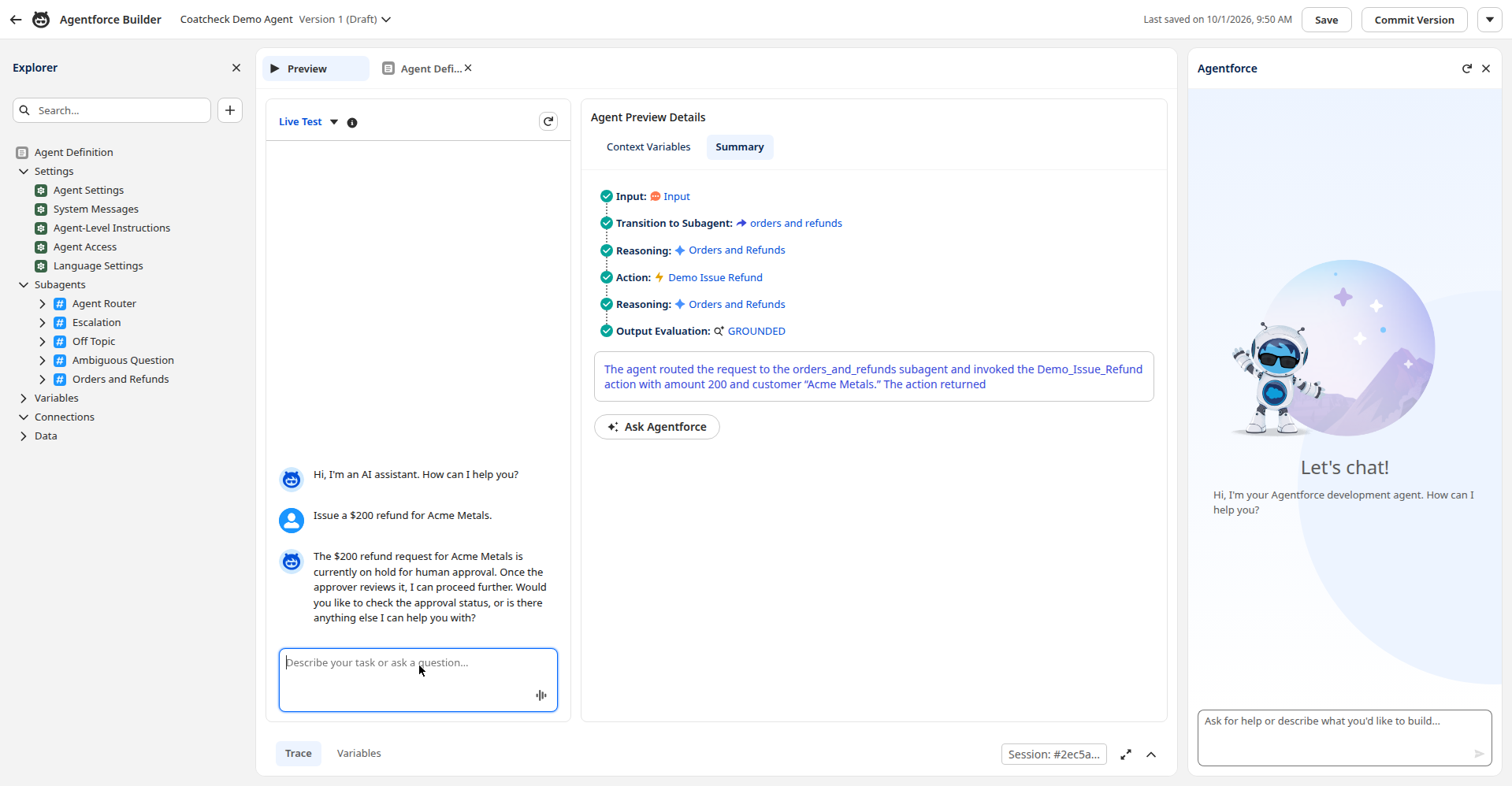
The agent preview. The agent does its normal routing — the hold happens inside the action, invisible to the agent's reasoning.
5 Run your first test
In the agent preview, try: "Create a $42,000 purchase order with Acme Metals."
- The agent reports the order is on hold for human approval.
- A card lands in
#agent-approvalswith the details. - Tap Approve — the card updates to a receipt, and the agent completes the order.
- Try Deny on the next one — the agent reports nothing was changed.
That's the whole loop. Everything from here is tuning.
Part 2
Make it yours
The rules are plain English, not code. A non-technical person can change them — and the change takes effect immediately, no redeploy.
The policy editor
Set the COATCHECK_ADMIN_TOKEN environment variable on your engine, then open https://<your-engine>/admin?token=<your-token>. This is the actual interface — shown here exactly as it renders:
Coatcheck policy settings
These are the rules your agents follow. Changes take effect immediately.
Heads up: on our current hosting plan, edits live in the engine's saved file, but that file is wiped when the service redeploys. For anything important, download a backup copy after saving — the file in our code repository stays the source of truth.
The real policy editor UI (static preview — the live page saves for real). Four lists control everything.
The four lists, in plain terms:
Spending limits
If an action involves more money than its limit, a person must approve it first. Set a default, then per-action overrides — e.g. order.create: $500.
Always needs a human
These actions are held every time, no matter the amount. Hiring, large transfers, contract signatures — the things you never want unsupervised.
Never allowed
Blocked completely — even a human can't approve these through the agent. Deleting users, granting permissions, changing the policy itself.
Free to do
Routine actions that never need approval. Reading records, running reports — the agent's everyday work flows without friction.
Try this: change the refund.issue limit from $100 to $250 and save. Then ask your agent for a $200 refund — it sails through. Ask for $300 — held. That's the whole customization story: one number, instant effect.
Adding a custom action
Every governed action follows the same pattern: ask the engine before doing anything, then enforce the answer. Here's the skeleton, adapted from the purchase-order action:
// 1. Ask the policy engine FIRST — before any business logic.
SentryOpsEvaluateAction.EvalRequest req = new SentryOpsEvaluateAction.EvalRequest();
req.agentName  = 'My Agent';
req.actionName = 'invoice.create';  // dot-namespaced, e.g. billing.adjust
req.paramsJson = JSON.serialize(new Map<String, Object>{
    'amount' => amount,
    'vendor' => vendor
});
SentryOpsEvaluateAction.EvalResult eval =
    SentryOpsEvaluateAction.evaluate(new List<SentryOpsEvaluateAction.EvalRequest>{req})[0];

// 2. Enforce the answer. There is no path around this.
if (eval.decision == 'allow') {
    // Do the thing.
    createInvoice(vendor, amount);
} else if (eval.decision == 'require_approval') {
    // Park it. The evaluation ID lets you resume after the human decides.
    holdForApproval(eval.evaluationId);
} else {
    // 'deny' — blocked outright. Nothing happens.
    blockRequest(eval.reason);
}
Then add the action name to policies.yaml (or the policy editor) — a spending limit, the always-hold list, or the allowlist. The check is in the doorway of the action, not in the agent's instructions — so no prompt trick can bypass it.
Customizing Slack messages
The card text lives in the engine's Slack payload builder. Every message is plain, friendly language written for a non-technical approver — no jargon, no scare tactics. Edit the templates to match your team's voice; the Approve / Deny / Snooze buttons and signature verification stay the same.
Safety floors: the rules policy can't override
Some rules shouldn't be editable at all. The Apex layer carries hardcoded guardrails that only ever make decisions stricter — never looser. Example: refund.issue is hardcoded to always hold, even if someone loosens the policy to auto-allow refunds under $250.
That's deliberate. The policy editor is for the business; the guardrails are for the worst day — a misconfigured policy, or an agent that talked someone into loosening it. We demoed exactly this: the policy said yes, the safety net said no.
Design guidance: put everyday thresholds in the policy (business-owned, easily tuned). Put the never-cross lines in guardrails (engineering-owned, changed in code review). The two layers disagree → the stricter one wins.
Part 3
Any agent, not just Agentforce
The policy engine is a plain REST API. If your agent can make an HTTP call, it can use Coatcheck — no Salesforce required.
Before your agent does anything consequential, it asks one question:
POST https://<your-engine>/v1/evaluate
{
  "agent":   "procurement-copilot",
  "action":  "order.create",
  "params":  { "vendor": "Acme Metals", "amount": 42000 },
  "context": { "user": "rich" }
}

→ 200 OK
{
  "decision":      "require_approval",   // allow | deny | require_approval
  "reason":        "This is $42,000, which is over the $500 approval limit…",
  "evaluation_id": "a3f9c1d2e4b5"          // track it in your audit log
}
Three possible answers, three behaviors:
- allow — proceed. The action is routine and within policy.
- deny — stop. The action is never permitted (or looks like an instruction-override attack). Nothing happened.
- require_approval — pause and wait. The engine notifies a human (Slack, email, your channel of choice); your agent resumes when the human decides, referencing the
evaluation_id.
The whole integration, in Python
import requests

ENGINE = "https://your-engine.onrender.com"

def coatcheck(agent, action, **params):
    """Ask Coatcheck before doing anything consequential."""
    r = requests.post(f"{ENGINE}/v1/evaluate", json={
        "agent": agent, "action": action,
        "params": params, "context": {},
    }, timeout=30)
    r.raise_for_status()
    return r.json()  # {decision, reason, evaluation_id}

# In your agent, at the moment of consequence:
verdict = coatcheck("procurement-copilot", "order.create",
                    vendor="Acme Metals", amount=42000)

if verdict["decision"] == "allow":
    create_purchase_order(vendor="Acme Metals", amount=42000)
elif verdict["decision"] == "require_approval":
    wait_for_human(verdict["evaluation_id"])  # poll GET /v1/decisions/{id}
else:
    log_blocked(verdict["reason"])             # denied — do nothing
Works with whatever you're building on
Agentforce
The Salesforce Apex pattern above — the check lives inside the invocable action. Covered in Part 1.
LangChain / AutoGen / CrewAI
Wrap the HTTP call in a tool guard: every tool that writes calls coatcheck() first and honors the verdict.
Microsoft Copilot
Any agent framework with an HTTP action or plugin step can call /v1/evaluate before executing a consequential step.
Snowflake Cortex
Cortex Agents are read-oriented by default (text-to-SQL, search). Real writes happen in your app layer through manual handlers — and that's where Coatcheck sits. Call /v1/evaluate in the handler before the write executes, and honor the verdict. Snowflake's built-in controls (Cortex Guard, Restricted Session Scope) limit what an agent can touch; Coatcheck asks a human before the write. Different job.
Custom scripts & cron jobs
A scheduled job that moves money or mutates records gets the same three-verdict check — ten lines, no framework needed.
The principle: the check sits between the agent's decision and the effect. It doesn't matter what model, framework, or prompt produced the decision — there's no path to the write that doesn't pass the check first.
Catalog
Use cases
Twenty-plus governed actions drawn from real production-agent deployments and incidents. Each one is a moment where an agent's judgment alone isn't enough.
Live in demos today
Purchase orders
order.create — held over the spending limit; held for new vendors regardless of amount. The canonical Coatcheck loop.
Refunds
refund.issue — held for a human; denials complete with "nothing was changed."
Account lookups
account.read — allowed instantly. Not everything needs a human; the counterpoint that makes the holds meaningful.
Money movement
Customer refunds at scale
refund.issue — the Klarna pattern: high-volume refund authority with human review on the exceptions.
Fund transfers
transfer.initiate — money moving between accounts. Irreversible-adjacent, always held.
Billing adjustments
billing.adjust — credits and contract-term changes in one session, two holds.
Payment processing
payment.process — payment after identity verification, held over threshold.
Procurement & manufacturing
PO quantity checks
order.create — the Procol pattern: agent orders 10,000 units instead of 1,000; the human catches what the agent didn't.
RFQs
rfq.issue — hallucinated supplier terms held for legal before they become contractual commitments.
Vendor invoices
invoice.create — agent-drafted invoices held for finance before they post.
In-chat ordering
order.create — the Hibbett pattern: agent-created orders with payment capture, wrong quantities caught.
Insurance, HR & data
Claim payouts
claim.approve — five-figure claim payouts held for fraud review.
Hiring actions
candidate.hire — agent moves a candidate to "hired"; held, with employment-law exposure in mind.
Bulk exports
data.export — "export all customer records" held as an exfiltration guard. The agent can't tell a malicious task from a business task — the action needs its own check.
Attack resistance
Privilege escalation
permission.grant — agent tries to grant itself admin rights → denied outright. No card, no human needed.
Prompt injection
Instruction-override attempts ("ignore previous instructions…") are detected and denied — including obfuscated variants. Policy is enforced outside the agent, not requested of it.
Audit trail
Every evaluation is hash-chained into an append-only ledger: who asked, what was decided, who approved, when. Verify it with GET /v1/ledger/verify.
"Planned" items have working policy definitions and Apex templates ready; they light up as actions are connected. If your use case isn't listed, the pattern in Part 2 covers it.
Reference
API reference
Every endpoint on one page. The engine speaks JSON over HTTPS; there's nothing else to learn.
| Method & path | What it does |
|---|---|
| POST /v1/evaluate | The core call. Send {agent, action, params, context}; get back {decision, reason, evaluation_id} where decision is allow, deny, or require_approval. |
| GET /v1/decisions/{id} | Read back one evaluation plus the human's current answer: pending, approved, denied, or snoozed. |
| POST /slack/actions | Slack interactivity endpoint. Verifies the request signature, records Approve / Deny / Snooze-1-hour, and posts a receipt. |
| GET /v1/ledger | Recent audit-ledger entries (?limit=N). Every entry carries the hash of the previous one. |
| GET /v1/ledger/verify | Recomputes the hash chain; reports tampering. Returns {"ok": true, …} when intact. |
| GET /health | Liveness check plus the loaded policy version. Hit this to warm a sleeping free-tier instance. |
| GET /admin?token=… | The plain-English policy editor (needs COATCHECK_ADMIN_TOKEN). When the token is unset, this returns 404 — the page doesn't exist as far as anyone can tell. |
| POST /admin/save?token=… | Saves policy changes from the editor. Takes effect immediately, no redeploy. |
Environment variables
| Variable | Needed for |
|---|---|
| SLACK_SIGNING_SECRET | Verifying Slack button signatures (from the Slack app's Basic Information page). |
| SLACK_BOT_TOKEN | The xoxb-… token the engine uses to post receipts. |
| COATCHECK_ADMIN_TOKEN | Unlocks /admin. When unset, the policy editor is disabled entirely. |
| SENTRYOPS_SF_CALLBACK_URL | Where the engine POSTs the human's decision for the Salesforce loop. |
| SENTRYOPS_SF_CALLBACK_SECRET | Shared secret sent with that callback; must match the Salesforce setting. |
| PORT | Listen port (default 8000). |
| POLICY_PATH | Path to policies.yaml. |
Ready to try it? The demos are at coatcheck.dev/#demo, and design-partner pilots start with a conversation: [email protected].